Options Trading for Beginners
From Zero → Demo → First Trade (Risk-Free)
Start Guide↓Important
If you have never traded options before, do not start with real money. This guide walks you step by step through a demo trade — exactly how professionals learn.
Before You Start
≈ 2 minutes
What you do now:
- ✕No real money
- ✕No complicated strategies
- ✓Demo account only
- ✓Learn by clicking & observing
Goal: Understand how options move — not make money right away.
Choose a Broker (the Right Way)
Before you trade anything, you need a broker. Not every broker is suitable for beginners in Germany.
Our recommendation:
First take our broker quiz. It helps you find the right broker from the top 3 for German traders.
→Go to Broker ComparisonWhat we look for:
Important: No matter which broker you choose — register for a DEMO ACCOUNT first.
Open a Demo Account (Mandatory)
After registration:
- ✓Switch immediately to demo or paper trading mode
- ✓Verify that no real money is being used
Checklist:
- ✓Balance = virtual
- ✓No real account charged
- ✓"Demo / Paper Trading" visible
⚠️ If you are not sure: Do not continue.
Understand Options — Really Simply
Before we click, read one quick thing — no jargon, no finance blah-blah:
≈ 3 minutes reading time — after that you'll understand the basic principle.
What Do We Trade? (Example: Silver)
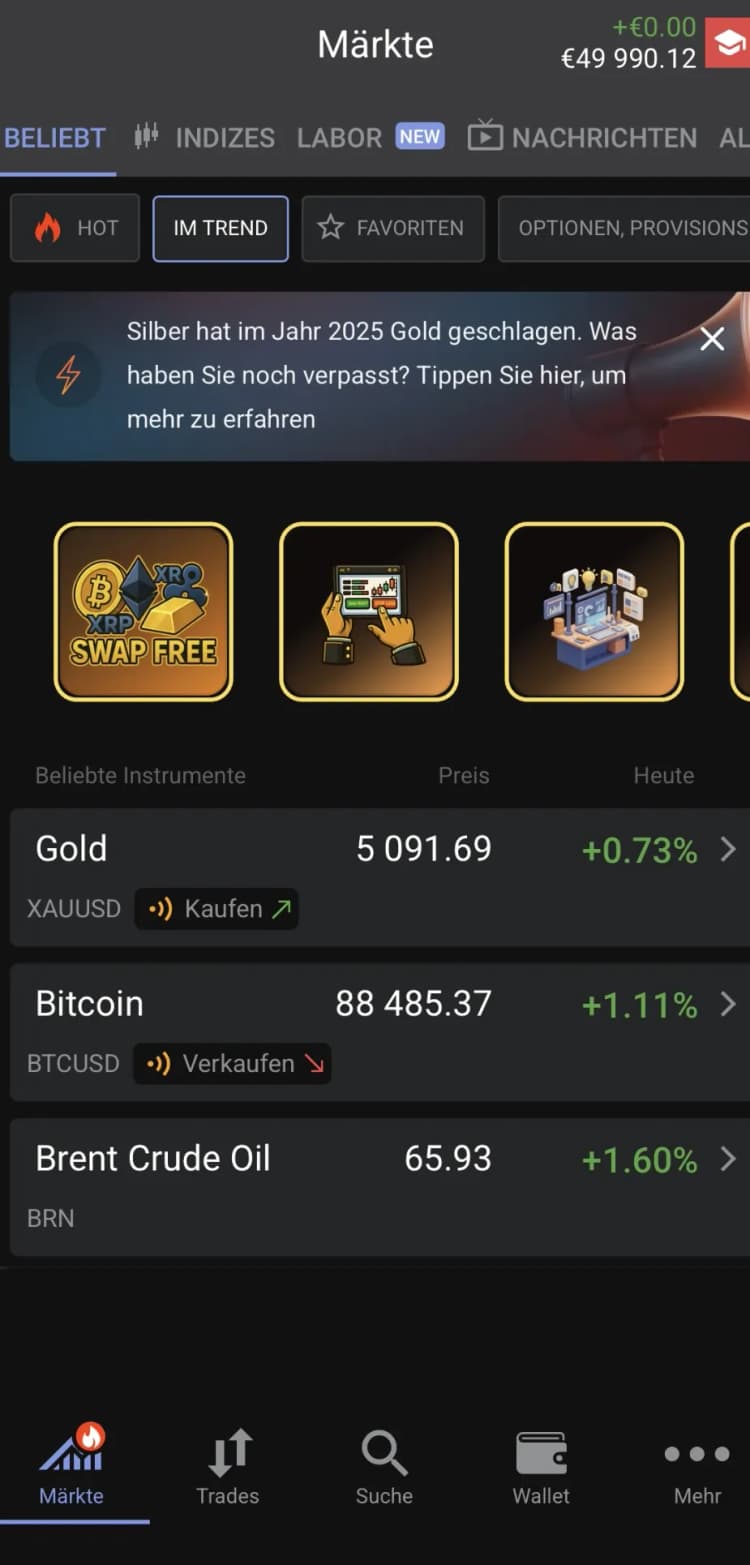
Step 1: Select Market
Open the Trading / Markets section. You typically see: Stocks, CFDs, Options, Commodities.
Many beginners start with CFDs to get a feel for the market. Open the section and search for Silver (XAGUSD).
→CFDs vs. Options — the DifferenceStep 2: Why Silver?
Silver is particularly suitable because:
- High volatility
- Clear movements
- Ideal for learning purposes
Demo Trade: Step by Step
Example: Silver / XAGUSD
Use demo mode only. Before every click, verify that you are not using real money.
Open the Options Chart (XAGUSD)
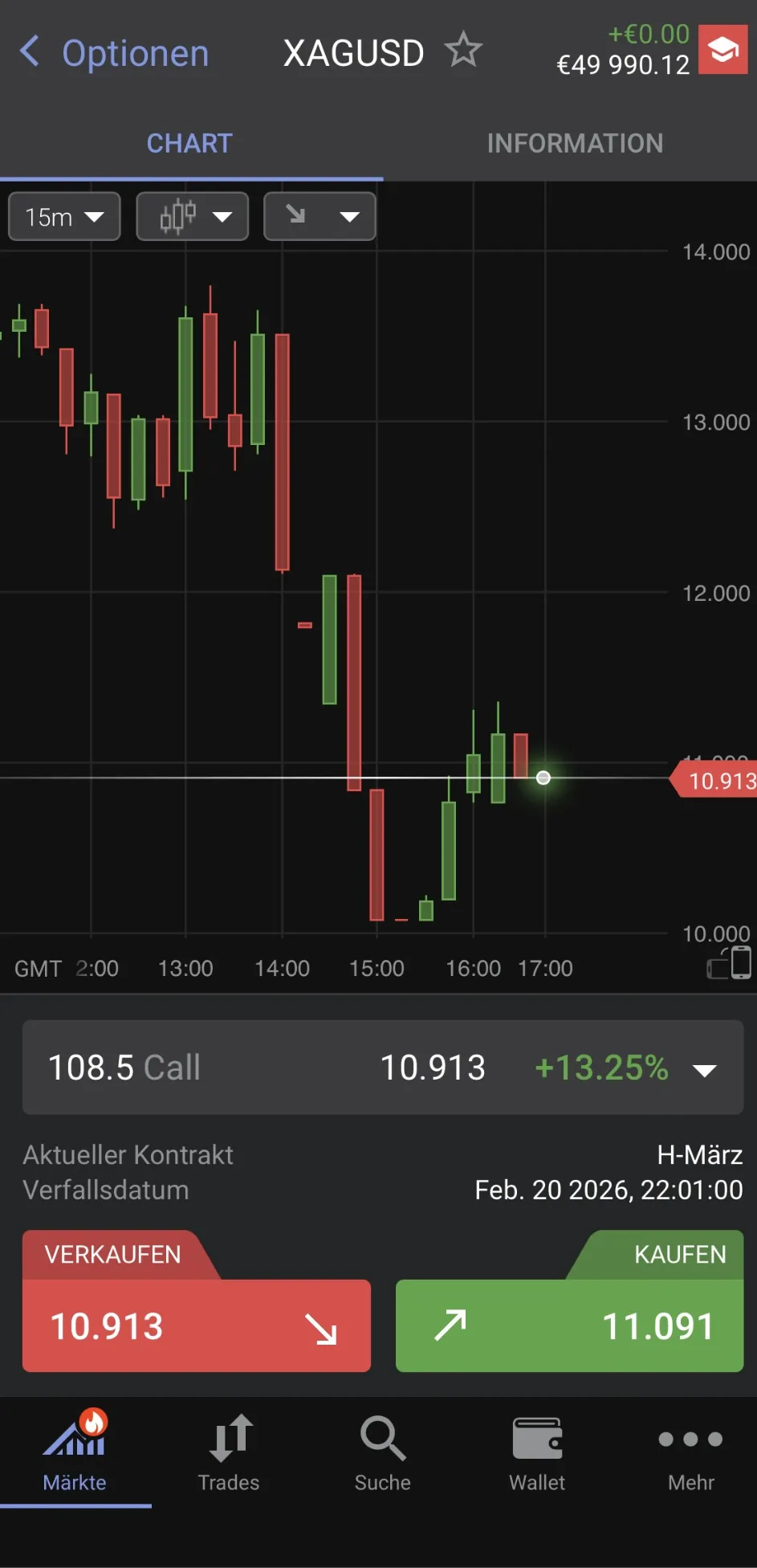
At the top you see XAGUSD (Silver) in the "Options" / CFDs section. The chart is set to 15 minutes (15m) — not too hectic, not too slow. Below, a contract (e.g. "108.5 Call") is auto-selected. On the right you see the option price and BUY / SELL buttons.
What you learn here
Call = you profit when Silver rises. The number 108/108.5 is the Strike (exercise price). Bid/Ask (Sell/Buy) → Spread is normal.
Choose Call or Put & Select Strike
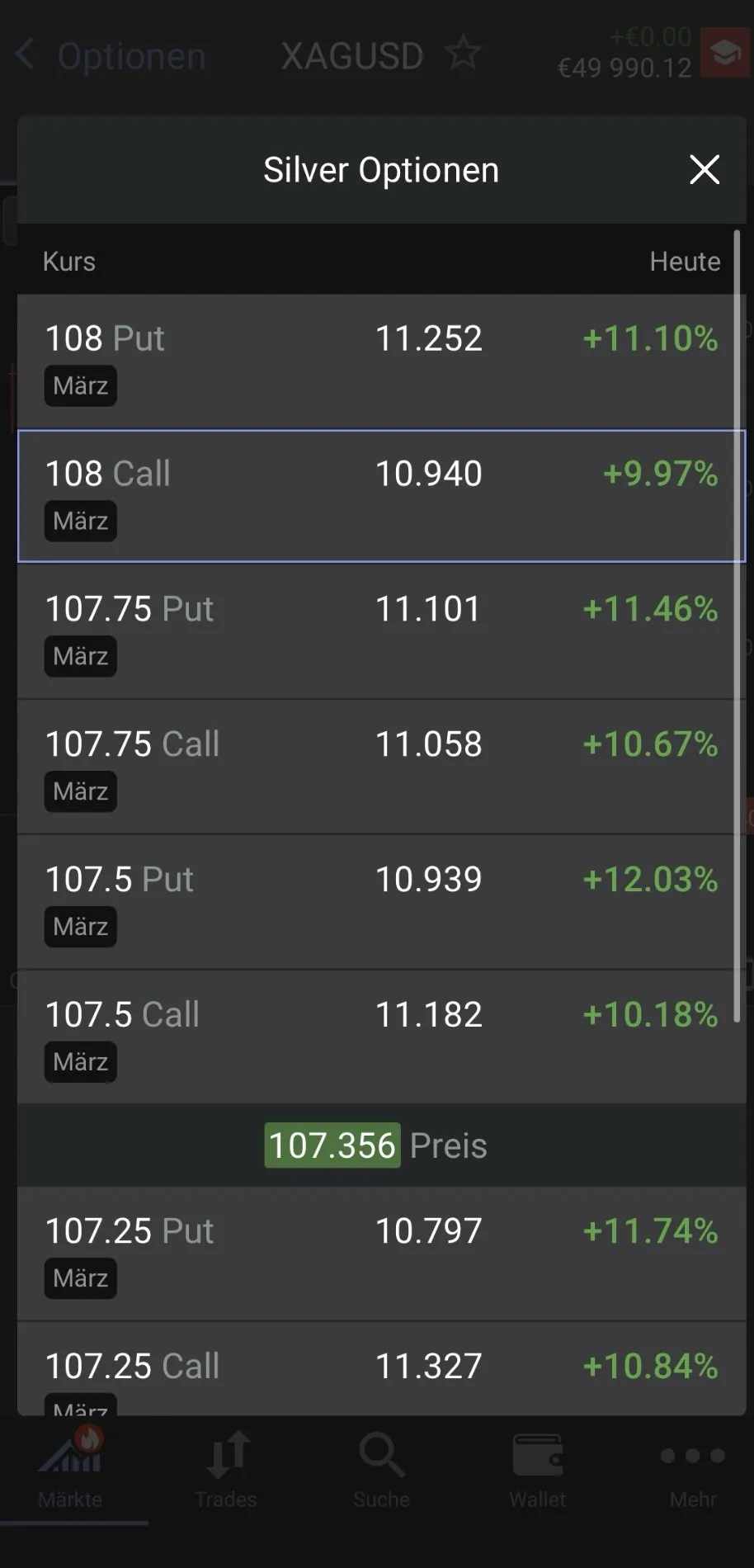
Tap the contract (top row). Choose Call (bullish — you expect Silver to rise) or Put (bearish — you expect Silver to fall). The list shows multiple strikes (e.g. 107.5 / 108 / 108.5) with different prices. Pick a strike close to the current price (ATM or slightly OTM) — it reacts faster to price movements.
What you learn here
Multiple strikes = different "price levels" at which the option becomes attractive. The percentages on the right show the daily movement of the option price (not Silver itself).
Tip
Avoid extremely cheap "lottery strikes" and very distant prices.
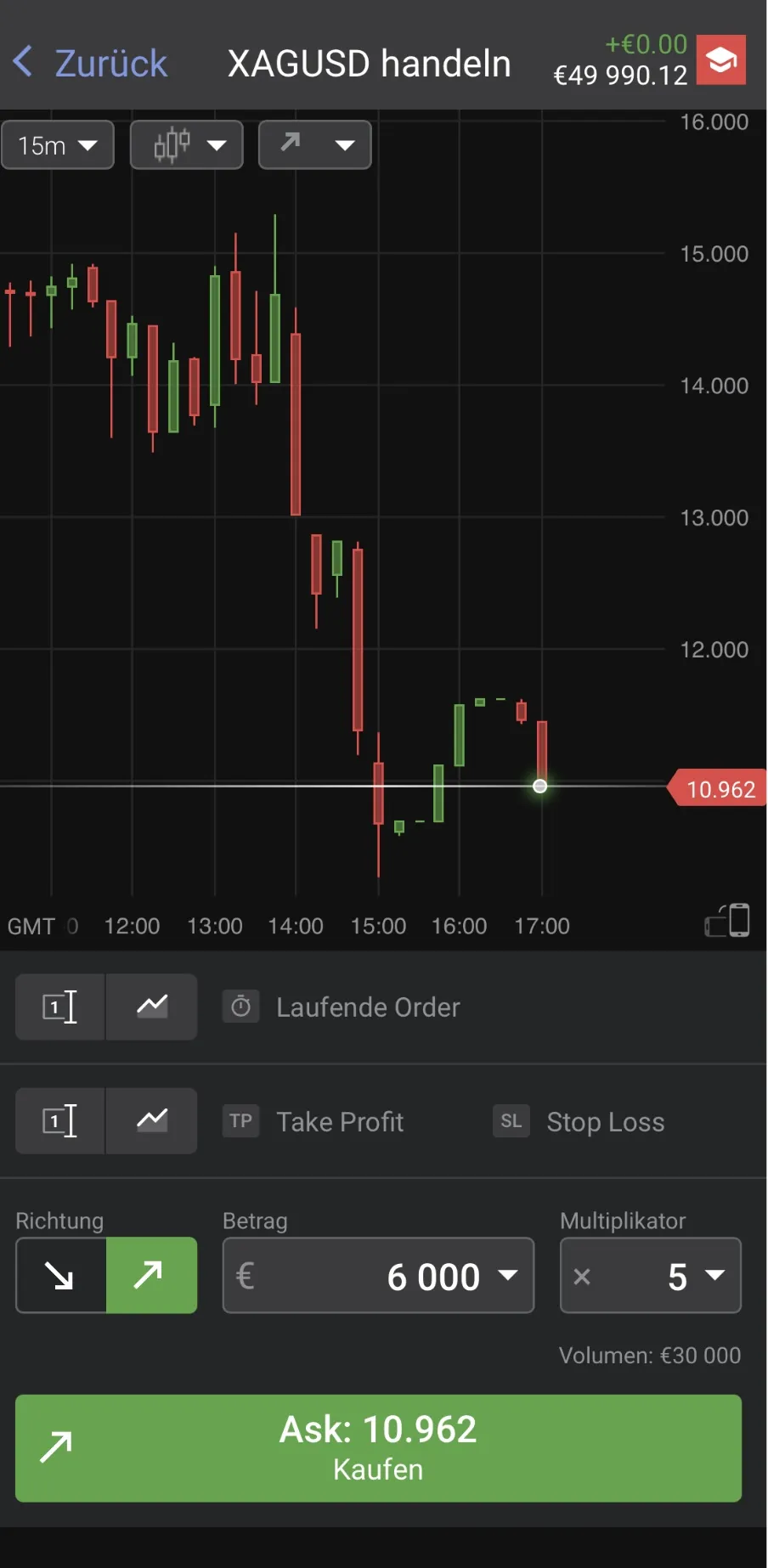
Fill in the Trading Ticket
Keep the position size intentionally small. Set the amount to 50–100 (in demo) and the multiplier to x1. This is not a real money trade — the goal is learning, not maximum profit.
Tip
Why x1? You see the effect of the option itself, without additional platform leverage — less confusion.
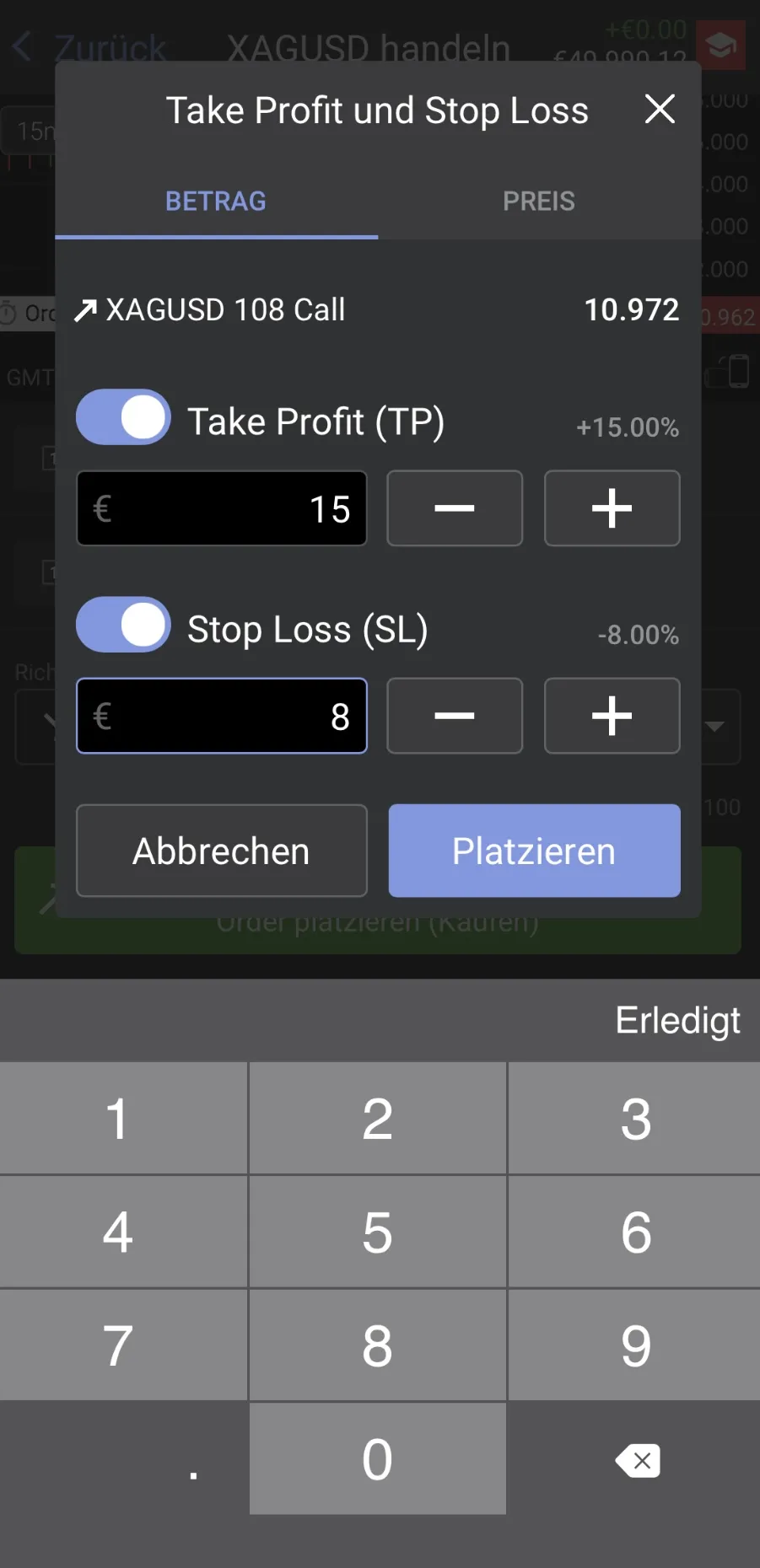
Set Take Profit & Stop Loss
Tap Take Profit (TP) and Stop Loss (SL). Set simple learning values: TP = target profit (e.g. +€15 in demo), SL = max loss (e.g. -€8 in demo). Then confirm with "Place".
What you learn here
TP/SL are risk rules, not a "profit guarantee". Define risk first, then open the trade.
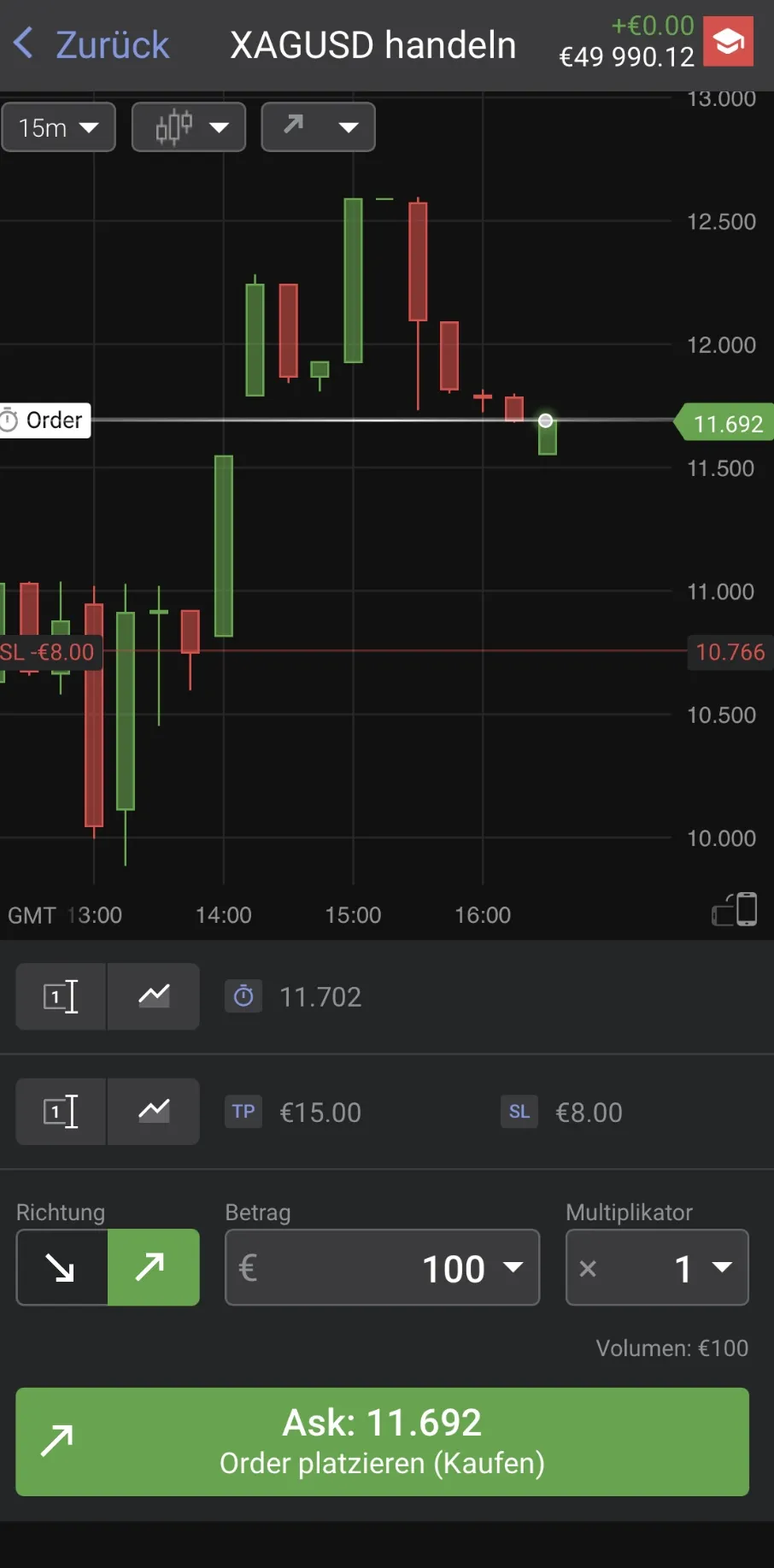
Review & Place Order
Check: Amount 100, Multiplier 1, Demo mode active, Call or Put correct, TP & SL set. Click "Buy / Place Order". This is your first structured options demo trade!
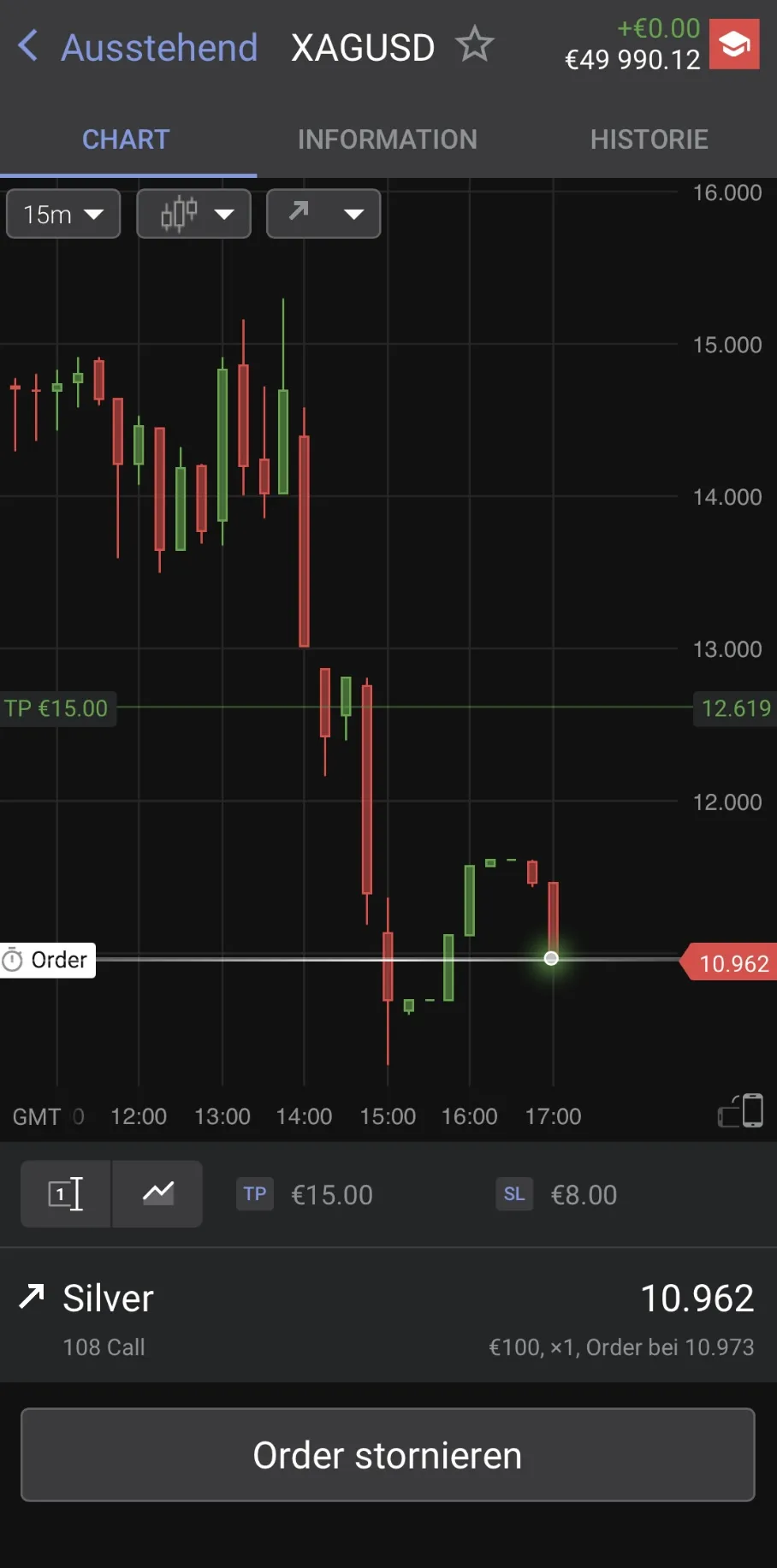
Watch the Pending Order
Status: Pending. You see the instrument (e.g. Silver – 108 Call) and the "Cancel Order" button. An order can wait until the price is reached — you can cancel it anytime.
Tip
Observe: price movement, option reaction, passage of time.
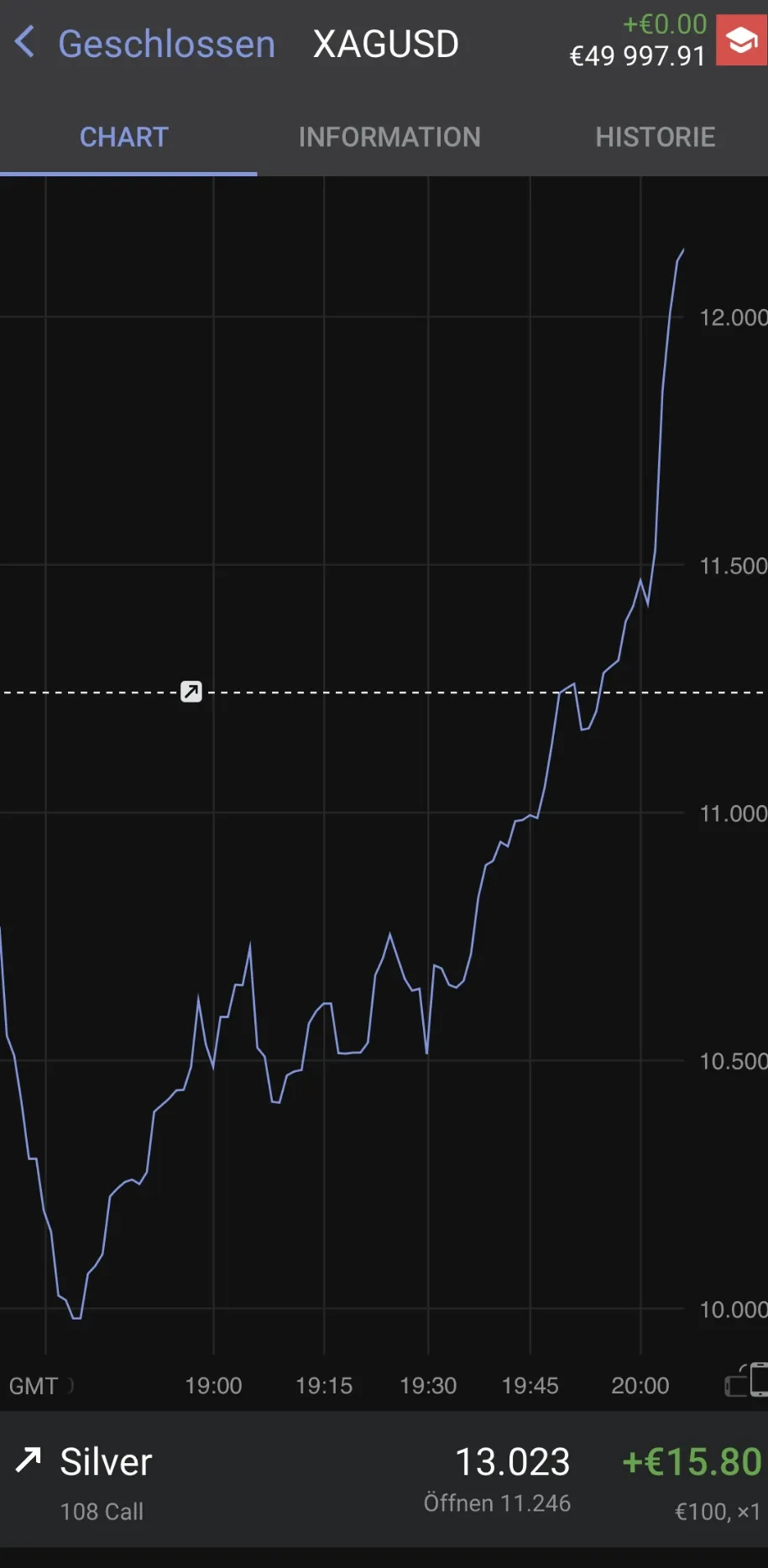
Closed Trade — Analyze the Result
Status: Closed. Result (P/L): e.g. +€15.80. When the trade ends via TP, SL, or manually, ask yourself: Did Silver move? How strongly did the option react? What was decisive — direction, time, or volatility?
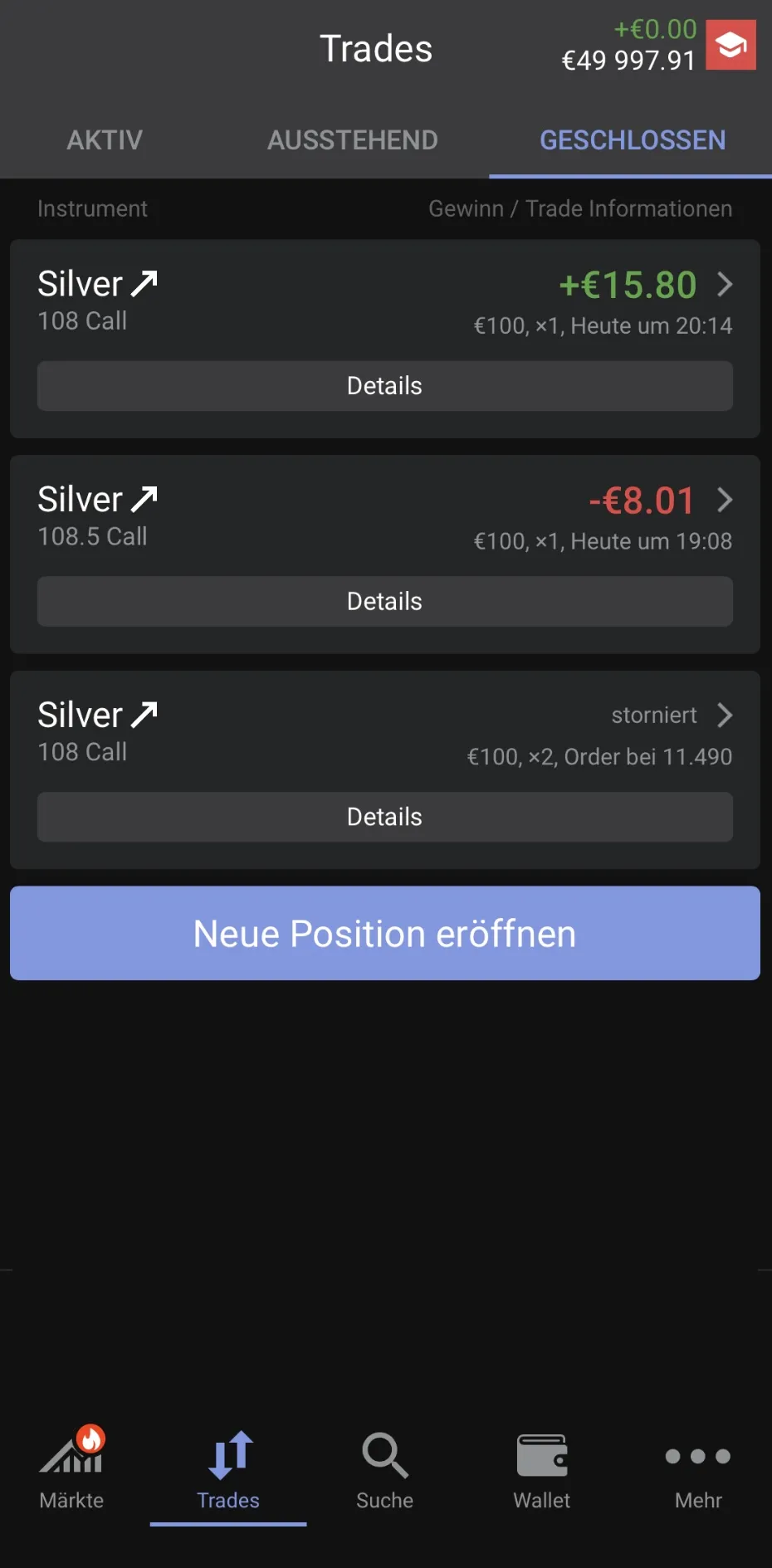
Closed Positions — Overview
Here you see three different results: (1) Winning trade — Silver 108 Call at +€15.80 (Take Profit hit), (2) Losing trade — Silver 108.5 Call at −€8.01 (Stop Loss triggered), (3) Cancelled order — no position opened, no money risked.
What you learn here
Not every trade is a win — and that is completely normal. What matters is controlled risk, clear rules, and consistent execution.
Watch the Process in Video
Short and clear — the complete demo trade in under 60 seconds.
After Your First Demo Trade
Mandatory before you continue
Only after that:
- More complex strategies
- Real money
- Larger amounts
Done!
You now know how options and CFD trading works and can independently execute simple trades.
Important Risk Warnings
- CFDs are complex instruments and carry a high risk of losing money rapidly due to leverage.
- 67–89% of retail investor accounts lose money when trading CFDs. Consider whether you understand how CFDs work.
- Only invest capital you can afford to lose. Always set a Stop Loss to limit your risk.
Frequently Asked Questions
The most important questions about options trading for beginners.
What is a demo account and why should I start with one?+
A demo account simulates real trading with virtual money. You can test strategies, get to know the platform, and make mistakes — without losing money. Professionals recommend completing at least 20 demo trades before investing real money.
What is the difference between Call and Put?+
A Call option profits from rising prices — choose Call when you expect the price to go up. A Put option profits from falling prices — choose Put when you expect the price to go down.
What does the strike price mean?+
The strike price is the price level at which an option becomes "attractive." A strike close to the current market price (ATM) reacts more strongly to price movements. For beginners, we recommend strikes close to the current price.
Why should I set the multiplier to x1?+
With x1 you see the pure effect of the option without additional leverage. Higher multipliers amplify both profits AND losses. For learning, x1 is ideal because it is less confusing.
What are Take Profit and Stop Loss?+
Take Profit (TP) automatically closes your trade at the target profit. Stop Loss (SL) automatically closes it at the maximum loss. Both are risk rules — always set both BEFORE you open a trade.
How often should I practice in demo mode?+
At least 20 trades. Test different strikes, try both Call and Put, observe how option prices behave under different market conditions. Only after that should you think about real money.